RevuApp Features — Everything Included
Features

Everything RevuApp includes. One login, not five subscriptions.

Reviews from every platform, review requests by text and email, AI-drafted responses, competitor tracking, social content, all of it. Browse the categories below to see exactly what's included.

See My Free Audit

Most of what's on this page is normally four or five separate tools. A standalone review platform with AI responses and competitor tracking typically starts around $300–$400 a month before you add texting or social content on top, and hiring an agency to run it by hand usually runs $500 to several thousand a month. It's included here, in one dashboard.

Running more than one location? Every tool below works independently per location, reviews, campaigns, reports, and QR codes never mix between them.
Browse by category below — tap or click any feature to see exactly what it does.
Overview

Dashboard

Your business at a glance.

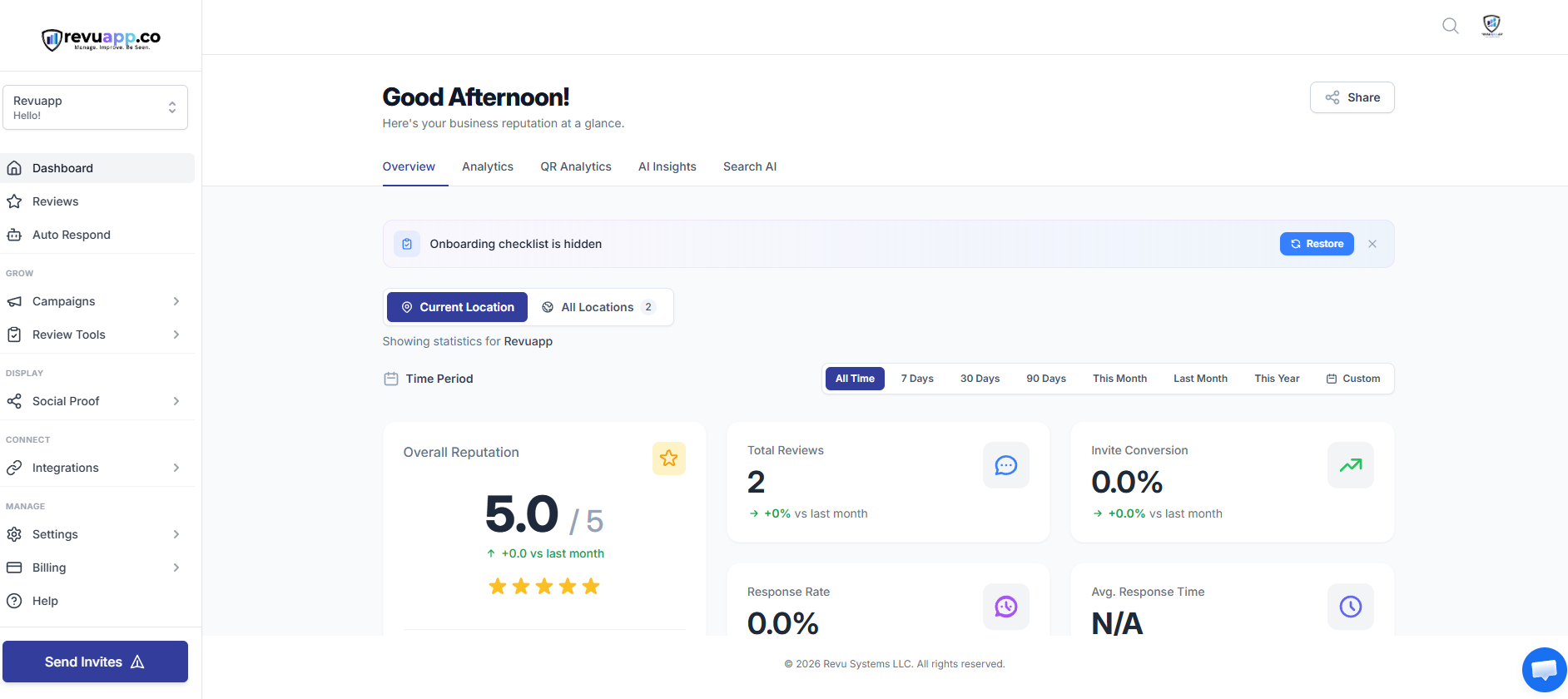
The moment you log in, you see what matters most: your overall rating, how many new reviews came in, your response rate, and anything that needs attention today. It's built to answer "how am I doing right now" in five seconds, not send you hunting through menus.

Overview

Reviews

Every review, from every source, in one inbox.

All your reviews land in a single list, whether they came from Google, Facebook, or any of the other 65+ platforms RevuApp can pull from. Filter by rating, by source, or by location if you run more than one. No more logging into five different sites just to see what people are saying about you.

Overview

Auto Respond

Replies that sound like you, without writing them every time.

RevuApp can draft a reply to any review in your own tone, ready for you to read, tweak, and post in one click. If you'd rather not touch it at all, set rules so certain reviews (say, anything 4 stars and up) go out automatically, while anything lower gets held for you to handle personally.

  • AI-drafted replies you approve before they post, or fully automatic if you choose
  • Filter by star rating so low reviews always come to you first
  • Bulk-respond to older reviews you never got around to
Insights

Sales Intelligence

See exactly how you stack up against the competition.

One report shows your reputation next to your closest local competitor: review volume, response rate, star rating, and how visible you actually are in search. It's the same kind of side-by-side breakdown an agency would charge to put together, generated for your business in a couple of minutes.

Insights

Local Search Grid

Where you actually rank, block by block.

A single search from your own phone is quietly biased toward your location, so it isn't a fair test. This scans a real grid of points around your business and shows exactly where you show up on Google Maps at each one, so you see where you win, where you fall off, and how that compares to your top competitor down the street.

Insights

Search AI

Are you showing up when people ask AI instead of Google?

A growing share of people ask ChatGPT, Gemini, or Perplexity for local recommendations instead of searching Google directly. This tracks whether your business gets mentioned in those answers, who's getting recommended instead of you, and what tends to move the needle.

Insights

AI Insights

What your reviews are actually telling you.

Reading through hundreds of reviews to spot a pattern isn't realistic for anyone running a business. This does it for you: what customers consistently love, where complaints are quietly building before they become a trend, and what's improved since last month, delivered as a scheduled report instead of something you have to go dig for.

Grow › Campaigns

Request Reviews

Ask for reviews automatically, by text or email.

Send review requests by SMS and email instead of relying on remembering to ask in person. Templates are already written to convert, use them as-is or make them sound like you. No limit on how many you send.

Grow › Campaigns

Invites

Build the list you're going to ask.

Add customers as you go, one at a time after a visit, or in a batch from a spreadsheet. This is the list Request Reviews sends to, so keeping it current is what keeps new reviews coming in steadily instead of in one-time bursts.

Review Tools

Feedback Forms

A review funnel that's actually built to convert.

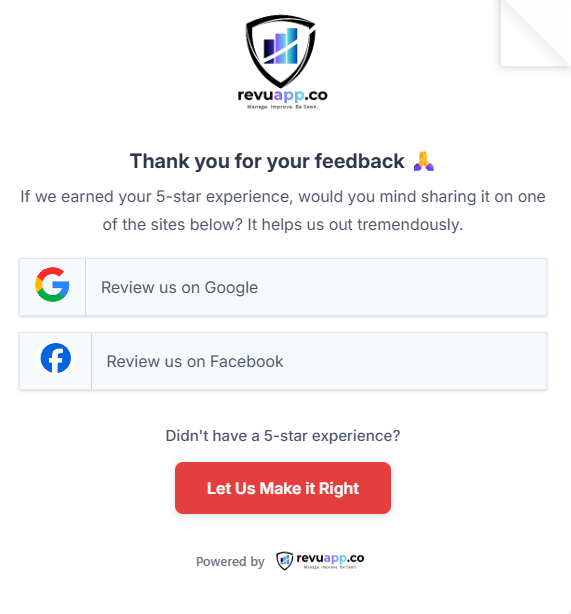
When someone scans a QR code or clicks a link, they land on a short, mobile-friendly form, not a wall of text. Choose from a few rating styles and color themes, offer AI-assisted writing for anyone stuck on what to say, and route low ratings to a private form so you hear about problems directly instead of finding out on Google first.

  • Multiple rating styles and color themes to match your brand
  • Low ratings route privately to you first, not straight to Google
  • Multi-language support if your customers need it
Review Tools

QR Codes & NFC

One scan, straight to leaving a review.

Print-ready QR codes for your counter, receipts, or table tents, plus tap-to-review support if you've got an NFC-enabled card or sticker. Every code is tracked individually, so you can see exactly which one is actually getting used, not just a total count.

It works because the ask happens the moment a customer is already holding something, the bag, the receipt, the check, instead of a separate request from staff. Scanning takes about ten seconds: no app, no login, straight to your feedback form, then straight into your dashboard.

  • No app or account needed to leave a review, just a scan
  • Public review and private feedback shown side by side, nothing hidden
  • Every scan tracked back to the exact sticker or code that drove it
Review Tools

Review Cards

A personal ask beats a generic one.

Same QR your stickers use, printed on a pocket-sized card instead, made for sit-down service. Leave one at the table or tuck it into the check presenter.

The detail that makes these work: have your server jot their own name on the back before it goes out. "Please leave us a review" is easy to ignore. "Leave Amanda a review" is a lot harder to skip, it turns an anonymous ask into one for the specific person who just took care of the table.

  • Same scan, same feedback form, same dashboard as your stickers
  • Built for table service, where a sticker on a bag doesn't apply
  • The blank line on the back is the whole point, don't skip it
Review Tools

Testimonials

Collect your own quotes, not just what lands on Google.

Some of your best feedback never makes it to a public review site. This gives you a way to collect it directly, with photos if customers want to add them, and display it right alongside your real Google and Facebook reviews with a verified badge so it doesn't read as made up.

Review Tools

AI Review Assistant

Helps customers who don't know what to say.

A lot of willing reviewers stall out at a blank text box. This walks them through a few quick questions about their visit and turns the answers into a natural-sounding review draft they can edit before posting, so more of your willing customers actually finish instead of abandoning it halfway.

Display › Social Proof

Widgets

Put your real reviews on your own website.

Sliders, grids, carousels, and badges you can drop into your website with one line of code. They update automatically as new reviews come in, so you're never stuck with a manually pasted screenshot from six months ago.

Display › Social Proof

Social Share

Turn a great review into a social post in under a minute.

Pick a review, drop it into a ready-made design, and post straight to your Google Business Profile, Facebook, or Instagram. No separate design tool required.

Connect › Integrations

Sources

Connect every platform your customers actually use.

Google is the big one, but RevuApp can pull reviews from 65+ other sources too, useful if your industry leans on a specific platform like Tripadvisor, Yelp, or something more niche. Everything funnels into the same inbox either way.

Connect › Integrations

Custom Sources

Track a review site that isn't on the standard list.

If there's a platform specific to your industry or area that isn't built in by default, this lets you add it manually so it's still tracked in one place with everything else.

Connect › Integrations

Automations

Rules that run in the background so you don't have to.

Set up simple if-this-then-that rules, like getting a text the moment a 1 or 2 star review comes in, so nothing sits unnoticed for a week. It's the difference between catching a problem the day it happens versus a month later.

Manage › Settings

Reports

The numbers, delivered, not something you dig for.

Scheduled performance reports on review volume, response rate, and rating trends, sent to your inbox on whatever cadence you want. Good for a monthly gut check without logging in just to check a number.

Manage › Settings

Notifications

Know the moment something needs your attention.

Get alerted the instant a new review comes in, especially the low ones, so you can respond fast instead of finding out from a customer mentioning it to you in person.

Manage › Settings

Team

Give your manager access without handing over the keys.

Add staff or managers with their own login, and control exactly what they can see and do, whether that's just replying to reviews or full access to everything. Useful the moment you're not the only person who needs to be in here.

Manage › Settings

Sender Domain

Review requests that don't look like spam.

Emails go out from your own domain instead of a generic address, which matters both for how trustworthy they look and whether they land in an inbox instead of a spam folder.

Manage › Settings

Email

How your review request emails actually get delivered.

The settings behind your outgoing review request emails, deliverability and sending handled for you behind the scenes.

Manage › Settings

SMS

How your review request texts actually get sent.

The settings behind your outgoing review request texts. Texting typically gets opened faster than email, often the quickest way to get a request in front of someone right after they walk out the door.

See what this looks like on your own business.

Run a free audit and see your real numbers before you decide on anything.

Get My Free Audit
© 2026 Revu Systems LLC. RevuApp is a product of Revu Systems LLC. Pricing comparisons reflect 2026 industry research on reputation management software and services.